
Automate scheduled runs, DAG fan-out, branching, retries, human approvals and webhook-triggered workflows with graph pipelines — a visual canvas of nodes and edges that reuses the same serverless functions as your HTTP routes. Schedules are configured as pipeline triggers.
Build a pipeline as a visual graph: a canvas of trigger, logic, and function nodes wired together by edges. Pipelines live under Pipelines in the sidebar — click New pipeline to open the graph editor, then drag nodes from the palette and connect their handles to define execution order.
Visual graph editor#
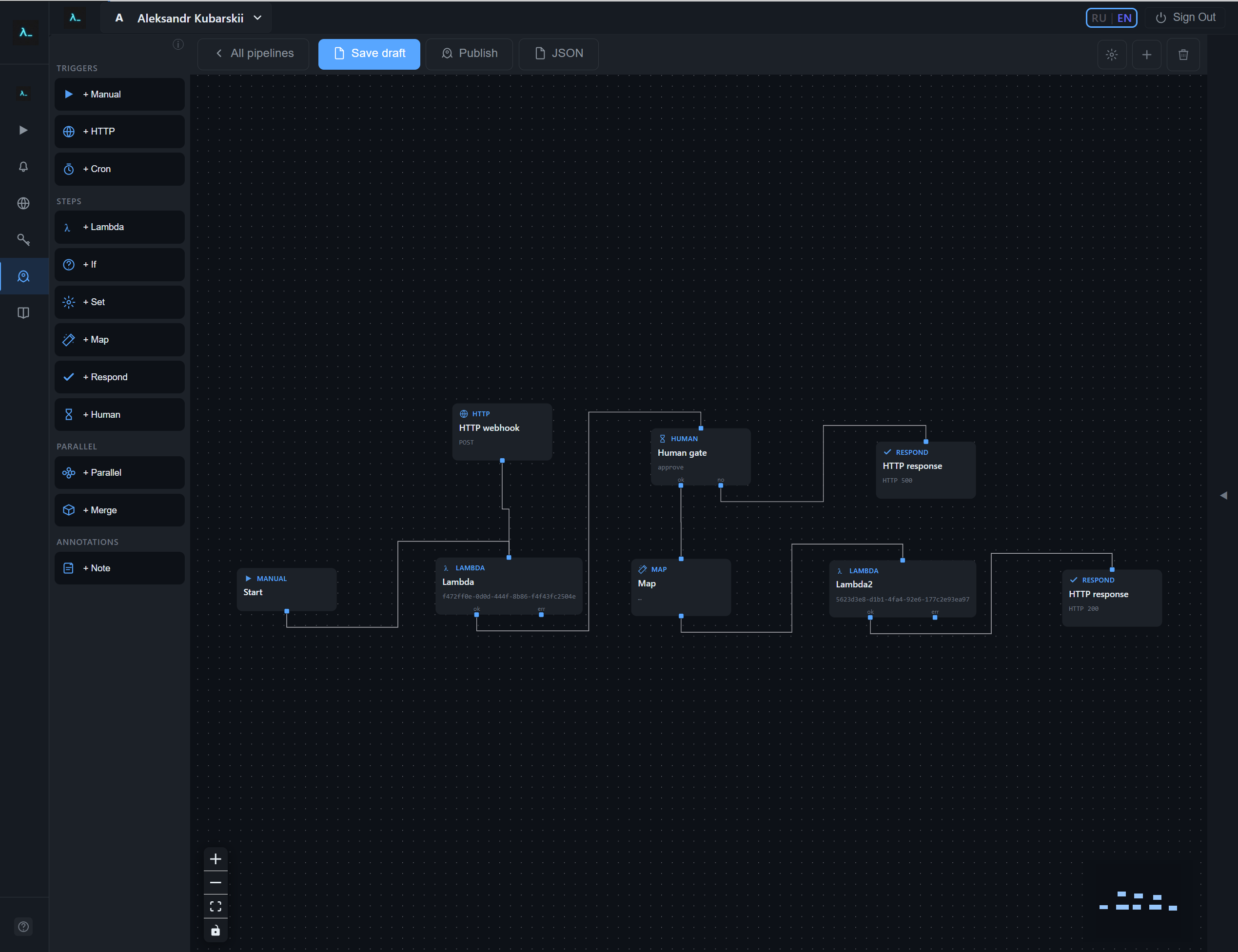
The graph editor targets HTTP-style workflows: triggers feed Lambda and control-flow nodes, a Map node shapes JSON, and Respond sends the HTTP response to the client.
- From Pipelines, open a visual pipeline card and choose Open visual editor (or create one with New visual pipeline).
- Drag node types from the left palette — Triggers (Manual, HTTP, Cron), Steps (Lambda, If, Set, Map, Respond, Human), the Parallel group (Parallel and Merge), and Note. Connect handles to define execution order.
- Click a node to edit its settings in the side panel (function binding, expressions, template JSON, status codes, and so on).
- Note nodes are documentation-only: they are not executed and must not be connected by edges — use them as on-canvas annotations.
The visual editor lets you wire Manual, HTTP, and Cron triggers into Lambda, If, Map, Respond, and Human nodes; the screenshot below shows the canvas inside the console.
Graph node types (reference)#
Connect a node's bottom handles to the top handle of the next node. Triggers, Parallel, Map, Set, and Merge expose one default output. Lambda exposes ok and err outputs, and If exposes true and false. Human gate in approve mode exposes ok and no outputs (the approve/reject handles); in question mode it uses one default output. Respond and Note have no outgoing handles. The graph must always include at least one trigger.
Manual trigger#
Starts a run from the pipeline UI or the execute API. It requires no extra configuration. Use this node (or another trigger) as the beginning of a path.
HTTP trigger#
Starts a run when the pipeline's public HTTP entry receives a request with the configured method and path (for example, POST /hook). The node also stores authentication metadata for that entry (none, API key, or bearer); defaults apply when you add the node from the palette.
Cron trigger#
Starts a run on a schedule. Set a five-field cron expression and a timezone string such as UTC. The minimum interval is one minute, and the scheduler polls roughly every 30 seconds, so a run fires within about half a minute of its scheduled time. An invalid cron expression—or one that fires more often than the minimum—is rejected when you save or publish.
Lambda (function)#
Invokes a workspace function; pick the function in the properties panel. The on-error setting controls what happens when the function fails: failPipeline stops the run, continue still follows the ok handle while recording the failure, and errorBranch routes to the err handle—wire that handle for recovery paths. Leave the input payload override empty to pass along the previous node's output, the trigger body when the node follows a trigger, or a structured error payload when a prior step failed and the graph continued. Override JSON uses the same template placeholders as elsewhere, but input is not wired for that field—use trigger, vars, and steps paths instead. The executor supports retryPolicy in the graph JSON; the UI focuses on the function, onError, and the override.
If (branch)#
Splits the flow based on a boolean expression. Connect both the true and false outgoing handles. The condition is evaluated as a JavaScript expression in an isolated sandbox and wrapped in Boolean(…), so comparisons (===, !==, ==, !=, and numeric > / >= / < / <=), the logical operators && and ||, ternaries, and a single path for truthiness all work. For safety the source is rejected up front if it contains semicolons, newlines, backticks, // or /* comments, \u/\x escapes, or the identifiers import, require, eval, Function, or constructor. The bindings available in the expression are input, trigger, vars, steps, inputs, and ifResult. input.* is built from the previous step's output: a string that looks like a JSON object or array is parsed, so its fields work like a Lambda JSON body. Values written by Set nodes are shallow-merged into the same input view (vars override on duplicate keys); you can still reference vars.NAME or steps.NODE_ID.output… explicitly. The default step output is the upstream payload unchanged—the condition value is stored separately as ifEvaluated on the step, not mixed into the output. To attach the boolean to JSON for downstream nodes, set Output shape (outputMapping), for example with {{ifResult}}. The optional Output shape accepts {{input}}, {{ifResult}}, {{vars…}}, and {{steps…}}.
Write a JavaScript boolean expression over input, trigger, vars, steps, and inputs. Combine conditions with && / || and ternaries—for example input.score > 50 && input.tier == 'pro'. Do not wrap the expression in {{ }}; that syntax is only for JSON template fields. Replace NODE_ID with a real graph node ID. Examples:
- Upstream string equals —
input.tier == 'pro'(single or double quotes around the literal). - Upstream number greater than —
input.score > 50 - Strict equality on a boolean-like field —
input.ok === true(also works withfalseornullon the right). - Another node’s output —
steps.NODE_ID.output.status == 'done' - Pipeline variable from Set —
vars.environment == 'production' - Numeric greater-or-equal —
input.retryCount >= 3 - Truthiness (non-binary form): a single path such as
input.recordIdorsteps.NODE_ID.output.items— the branch is true when the resolved value is truthy. - Inequality —
input.code != 404orinput.code !== 404(== / != allow coercion; === / !== do not).
Parallel#
Fans out from one incoming edge to many outgoing edges on the parallel handle. Each downstream branch runs independently until a Merge node (or another join pattern) collects them.
Merge#
Joins branches after Parallel. Mode all (the supported mode) waits until every direct predecessor branch has finished, then runs once. Without an outputMapping, a single incoming branch passes its payload through unchanged, and multiple branches produce an object with an inputs map keyed by each upstream source node ID. With an outputMapping, use {{inputs}} for the full map or {{inputs.someNodeId}} for one branch; with only one incoming edge, {{input}} is also set to that branch's payload, the same as Map.
Set#
Writes pipeline variables for later template placeholders. Provide a JSON object; the values may include template strings. Resolved entries are merged into vars. The node's output merges those values onto the upstream object when the upstream value is a plain object.
Map#
Builds the JSON for the next step using outputMapping and template resolution, with the upstream payload exposed as input in templates (see the JSON templates section below). If outputMapping is omitted, the engine passes input through unchanged.
Respond#
Completes an HTTP-triggered run: set the status code, optional response body templates, and optional response headers (a JSON object of header values; each value may use the same placeholders as the body). Leave the response body empty—no outputMapping or legacy bodyMapping—to return the previous step's output unchanged, or the trigger body when Respond directly follows a trigger. An example header object sets Content-Type to application/json and X-Request-Id to {{vars.requestId}}. This node has no outgoing edges. Prefer synchronous execution when the client should wait for this response.
Human gate#
Pauses the run until someone calls POST /api/pipeline-graph-executions/:executionId/resume. Approve mode requires two outgoing edges labeled approve and reject; the API body is { "decision": "approve" } or { "decision": "reject" }. Question mode uses one default edge; the body is { "answer": <any JSON> }. Optional promptTemplate is a JSON template ({{input}} is the upstream payload) stored on the waiting step for operators. The completed step output merges the upstream payload with humanGate: { mode, decision or answer, optional prompt }.
Note#
Adds documentation to the canvas: a title, a long description, an optional link, and a resizable box. Notes are not executed; do not attach edges to them. Reachability validation ignores notes.
How runs start#
Every graph must include at least one trigger node; the trigger determines how a run begins:
- Manual trigger — start a run from the pipeline UI, or over HTTP with
POST /pipeline-graphs/:id/executeand a JSON body (the body becomes the run's trigger payload). - HTTP trigger — give the pipeline its own public entry on a method and path (for example
POST /hook), with optional API-key or bearer auth; a matching request starts a run. - Cron trigger — run on a schedule (for example
0 */6 * * *), subject to the one-minute minimum interval.
Human approval#
To pause a run for a person, add a Human gate node (see the node reference above). In approve mode it waits until someone calls POST /api/pipeline-graph-executions/:executionId/resume with { "decision": "approve" } or { "decision": "reject" } and routes to the matching handle; in question mode it collects an answer and continues on its default edge.
Graph pipelines: JSON templates#
In the visual graph editor, several nodes accept JSON whose string values can contain placeholders. The engine replaces each segment written in the double-curly placeholder syntax (see the patterns below) with data from the current run.
{{input}}— Upstream payload from the previous node (or trigger body after a trigger). Use{{input.field}}for nested paths. Wired for Map, Respond (body and header values), optional If output JSON, and MergeoutputMappingwhen there is only one incoming branch.{{trigger.body}},{{trigger.type}}, etc. — Data from the run trigger (available in all template fields on these nodes).{{vars.name}}— Values written by Set nodes earlier in the graph.{{steps.NODE_ID.output}}— Output of a finished step; substitute your graph node id forNODE_ID. Nested paths work (e.g.{{steps.abc.output.score}}).{{inputs}}— While resolving a Merge node’soutputMapping, this object is keyed by each incoming branch’s source node id. Use{{inputs.someNodeId}}for one branch’s payload (substitute your graph node id).{{ifResult}}— While resolving an If node’s optionaloutputMappingonly: the boolean the condition evaluated to. In later nodes, the same value is available as{{steps.IF_NODE_ID.ifEvaluated}}(use the If node’s id). Not available inside the condition text itself.
If a string is only a single placeholder, the resolved value keeps its JSON type (object, array, number). Inside a longer string, values are stringified.
How the placeholders apply to each node:
- Lambda — Leave Input payload override empty to pass the previous node’s output (or trigger payload) unchanged. If you set it, build the object with
{{trigger…}},{{vars…}}, and{{steps…}}.{{input}}is not used for Lambda overrides. - Merge — Default behavior without
outputMappingis described under Merge above. CustomoutputMappinguses{{inputs…}}; with a single incoming edge,{{input}}works too. - If — The condition field is plain text (not
{{ }}). The engine buildsinputfrom the predecessor output (parses JSON-looking strings) merged withvarsfrom Set. Useinput.field,steps.id.output…, orvars…as needed. Optional Output shape is JSON with placeholders like Map, plus{{ifResult}}. - Map —
outputMappingdescribes the object this node emits;{{input}}refers to the upstream payload (engine default when omitted is pass-through{{input}}). - Respond — Optional
outputMappingshapes the HTTP body; omit bothoutputMappingand legacybodyMappingto return the upstream body as-is. Header values inheadersMappinguse the same rules (e.g. setContent-Typewithapplication/json). - Note — Not part of execution or templates; ignored by the engine. Do not attach edges to or from notes.
// In Map, Respond (body/headers), and Lambda input override, values may be JSON
// with strings like "{{trigger.body.field}}" or "{{steps.lambdaNodeId.output}}".

// Map node — outputMapping (default shape is pass-through of upstream via {{input}})
{
  "data": "{{input}}",
  "userId": "{{input.userId}}",
  "enriched": "{{steps.analyze.output}}"
}

// Respond node — optional outputMapping; omit it to return the upstream body unchanged
{
  "result": "{{input}}",
  "meta": { "source": "pipeline" }
}

// Respond headers (same rules; header values are strings after resolution)
{
  "X-Request-Id": "{{steps.firstLambda.output.requestId}}"
}

// Lambda — input payload override only when you need a custom shape (otherwise leave empty for chain input)
{
  "item": "{{trigger.body}}",
  "prior": "{{steps.stepA.output}}"
}